Transport Department
The Government of the Hong Kong Special Administrative Region
Appointment Booking For Direct Issue of HK Full Driving Licence/Temporary Driving Licence Counter Service
| Q1. What applications types can I make an appointment booking for using this online appointment booking service? |
| Q2. When will new booking slots be available? |
| Q3. What is the operation arrangement of the online appointment booking system? |
| Q4. How will the admission to the appointment booking system be arranged and how long will the queuing time be? |
| Q5. What do I need to prepare for making the appointment booking? |
| Q6. What are the system requirements of the computer used by Internet users of the Appointment Booking Service? |
| Q7. Is there any time limit for completion of the appointment? |
| Q8. How do I know I have successfully made an appointment? Under what circumstances will my booking be cancelled? |
| Q9. After I have successfully made a booking, can I amend the information I previously provided to make the booking? |
| Q10. I have tried several times and still cannot book a desired timeslot. What can I do? |
| Q11. Can I change or cancel my appointment? |
| Q12. What is the service hotline for the Appointment Booking Service? |
| Q13. If the services under Licensing Offices have been suspended due to adverse weather or other reasons, what shall I do with my appointment timeslot? |
| Q14. What are the acceptable formats for image files of documentary proof to be uploaded onto the online appointment system? |
| Q16. I have already been placed in the queue for the online appointment booking system. Why the “estimated waiting time” displayed in the queuing system keep increasing? |
| Q18. I have successfully made an online appointment. Can I visit the appointed Licensing Office at any time on my appointment date to submit my application?
|
| Q19. Are there any requirements regarding the email address I use to make the online appointment?
|
| Q20. I cannot enter the online appointment system? What are the possible reasons and what should I do?
|
Q1. What applications types can I make an appointment booking for using this online appointment booking service?
The designated online platform for appointment booking for Transport Department Direct Issue of Hong Kong Full Driving Licence / Temporary Driving Licence Counter Services can be accessed at: https://www.gov.hk/en/residents/transport/drivinglicense/diabs.htm.
This online service is applicable to appointment booking for Transport Department Direct Issue of Hong Kong Full Driving Licence / Temporary Driving Licence Counter Services:
If you wish to make an appointment booking to apply for a driving licence (other than direct issue of Hong Kong full driving licence / temporary driving licence), driving test and international driving permit, please go to https://www.gov.hk/en/residents/transport/drivinglicense/abs.htm.
This online service is applicable to appointment booking for Transport Department Direct Issue of Hong Kong Full Driving Licence / Temporary Driving Licence Counter Services:
- Hong Kong Licensing Office – Application for Direct Issue of Hong Kong Full Driving Licence / Temporary Driving Licence
- Kowloon Licensing Office, Kwun Tong Licensing Office and Sha Tin Licensing Office - Application for Direct Issue of Hong Kong Full Driving Licence submitted with Mainland driving licence
If you wish to make an appointment booking to apply for a driving licence (other than direct issue of Hong Kong full driving licence / temporary driving licence), driving test and international driving permit, please go to https://www.gov.hk/en/residents/transport/drivinglicense/abs.htm.
Q2. When will new booking slots be available?
The system open available booking slots in the coming four weeks for booking, and the slots will be updated 5:00 pm every working day.
Please note that the appointment booking system will be suspended from 4:00 pm to 4:30 pm every working day for updates. The links to enter the designated online appointment booking system will be changed after the updates. Please reload the webpage (https://www.gov.hk/en/residents/transport/drivinglicense/diabs.htm) at the appropriate time in order to access to the latest appointment booking system.
Please note that the appointment booking system will be suspended from 4:00 pm to 4:30 pm every working day for updates. The links to enter the designated online appointment booking system will be changed after the updates. Please reload the webpage (https://www.gov.hk/en/residents/transport/drivinglicense/diabs.htm) at the appropriate time in order to access to the latest appointment booking system.
Q3. What is the operation arrangement of the online appointment booking system?
The operation arrangement of the online appointment booking system on every working day is as follows:
*Please note that the appointment booking system will be suspended from 4:00 pm to 4:30 pm every working day for updates. The links to enter the designated online appointment booking system will be changed after the updates. Please reload the webpage (https://www.gov.hk/en/residents/transport/drivinglicense/diabs.htm) at the appropriate time in order to access to the latest appointment booking system.
| 4:00 pm to 4:30 pm* | The system is suspended for updates* |
| 4:30 pm to 5:00 pm | Pre-queue period |
| 5:00 pm | Queuing officially commences, and a queue position is immediately and randomly assigned |
| 5:00 pm to 4:00 pm of the next working day | Applicants are placed in the queue and entered into the system according to the actual time of entry |
Q4. How will the admission to the appointment booking system be arranged and how long will the queuing time be?
Admission to the appointment booking system will be arranged in small batches and queuing time may therefore vary. Depending on the actual booking situation, successfully entering the system does not mean that there are still booking slots available. If the service you selected when entering the system has no available booking slots, please note that available booking quotas will be updated at 5:00 pm every working day and quotas from cancelled or changed bookings will also be released so you may try booking again at the appropriate time.
Q5. What do I need to prepare for making the appointment booking?
Please have the following ready for making the appointment booking:
HK Identity Card Holder
Non-HK Identity Card Holder/People who have not registered “iAM Smart” account
Please enter true and accurate information of the applicant and upload relevant supporting documents (if applicable) into the system, as well as to provide an email address that can receive one-time password for instant verification (one-time password will be sent via tdabs@td.gov.hk). Information provided in booking must be identical to the applicant’s identity document and licence. Otherwise, the booking is considered invalid and the relevant application will not be processed. If the applicant information entered or service category selected during the booking is inaccurate, you will have to make a new appointment.
HK Identity Card Holder
- Applicant's registered "iAM Smart" account
- Applicant's driving licence number and Chinese name (if applicable)
- Valid email address (temporary or disposable email addresses are not accepted)
Non-HK Identity Card Holder/People who have not registered “iAM Smart” account
- Clear image file* of the front side and number of the applicant's identity document (such as Passport/ Exit-Entry Permit for Travelling to and from Hong Kong and Macao, etc.) (see the image below)
- Clear image file* of the front side and number of applicant's physical driving licence (see the image below)
- Valid email address (temporary or disposable email addresses are not accepted)
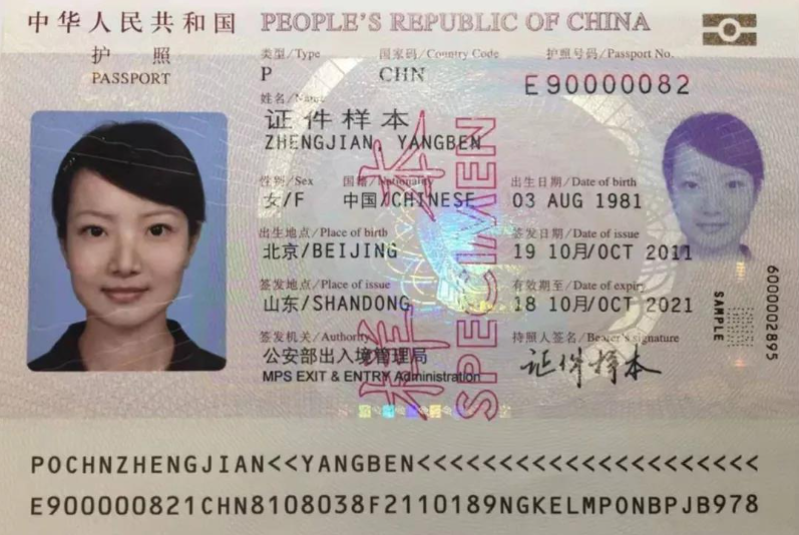
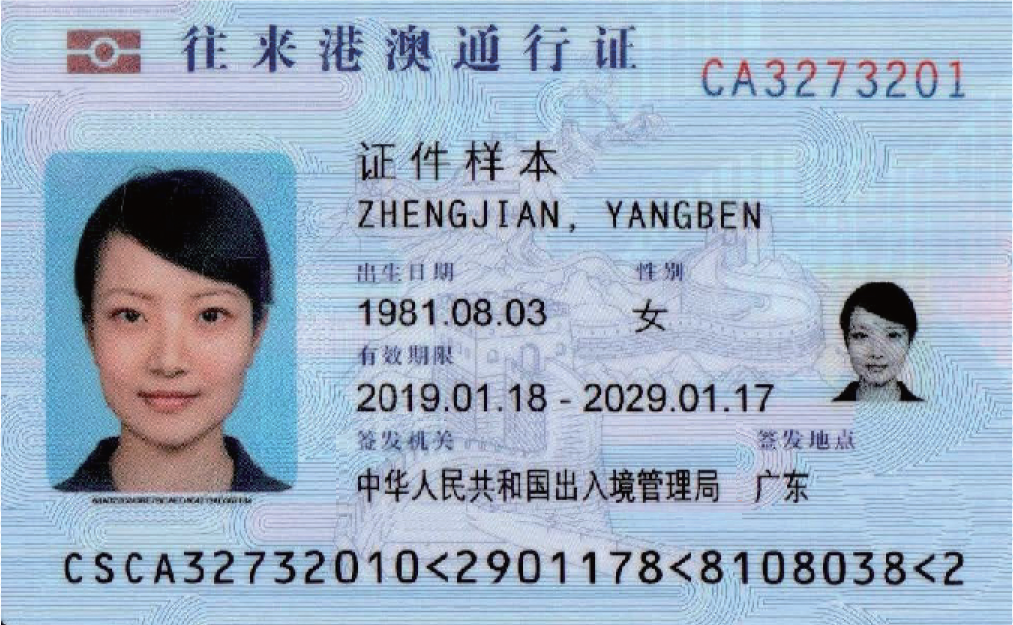
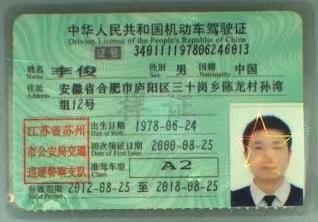
Please enter true and accurate information of the applicant and upload relevant supporting documents (if applicable) into the system, as well as to provide an email address that can receive one-time password for instant verification (one-time password will be sent via tdabs@td.gov.hk). Information provided in booking must be identical to the applicant’s identity document and licence. Otherwise, the booking is considered invalid and the relevant application will not be processed. If the applicant information entered or service category selected during the booking is inaccurate, you will have to make a new appointment.
Q6. What are the system requirements of the computer used by Internet users of the Appointment Booking Service?
The Appointment Booking Service is designed to work with the operating systems and software used by the majority of visitors to our website. Please see the section System Requirements for GovHK Online Services for further details.
Q8. How do I know I have successfully made an appointment? Under what circumstances will my booking be cancelled?
After you have provided all the requested information, you will be asked to confirm whether the information is correct. If your appointment is successful, you will receive an appointment booking confirmation email.
However, please note that if incomplete/invalid information has been provided during the appointment booking, or if a duplicate booking is made, the booking will be cancelled without further notice. Bookings involving irregular or suspicious activity, unauthorized tools or provision of suspicious information will also be cancelled. In addition, the Transport Department may disclose information provided by applicant through this appointment booking to relevant driving licence issuing authorities for verification. If missing or unmatched information has been identified, the relevant appointment booking will be cancelled. This department will investigate matters relating to suspicious bookings and does not rule out referring the case to law enforcement agency for follow-up.
However, please note that if incomplete/invalid information has been provided during the appointment booking, or if a duplicate booking is made, the booking will be cancelled without further notice. Bookings involving irregular or suspicious activity, unauthorized tools or provision of suspicious information will also be cancelled. In addition, the Transport Department may disclose information provided by applicant through this appointment booking to relevant driving licence issuing authorities for verification. If missing or unmatched information has been identified, the relevant appointment booking will be cancelled. This department will investigate matters relating to suspicious bookings and does not rule out referring the case to law enforcement agency for follow-up.
Q9. After I have successfully made a booking, can I amend the information I previously provided to make the booking?
Once a booking is made, you cannot amend the information you have provided to make the booking. If missing or unmatched information has been identified, the relevant appointment booking will be cancelled. Therefore, you are advised to check whether the provided information are correct and matching carefully before submission of appointment booking.
Q10. I have tried several times and still cannot book a desired timeslot. What can I do?
It is possible that your desired timeslot at the Licensing Office has been fully booked and you may try to book other timeslots at the Licensing Office. You may also check whether the timeslot is available at other Licensing Offices. Please note that Kowloon Licensing Office, Kwun Tong Licensing Office and Sha Tin Licensing Office only handle applications for Direct Issue of Hong Kong Full Driving Licence submitted with Mainland driving licence.
Q11. Can I change or cancel my appointment?
You can change or cancel your appointment, three hours before your appointed timeslot at the latest, easily via https://www.gov.hk/en/residents/transport/drivinglicense/diabs.htm. You are required to complete email verification again using the email address you used to make the booking. However, please note that you cannot amend the information (including the information of applicant and driving licence) you previously provided to make the booking. To allow making good use of timeslots, we encourage those who cannot show up at their appointed timeslots to change or cancel the appointment as early as possible.
Q13. If the services under Licensing Offices have been suspended due to adverse weather or other reasons, what shall I do with my appointment timeslot?
Please visit the press releases page of the Transport Department's website (https://www.td.gov.hk/en/publications_and_press_releases/press_releases/index.html) to learn about the latest arrangements.
Q14. What are the acceptable formats for image files of documentary proof to be uploaded onto the online appointment system?
The acceptable formats for image files are as follows:
*Standards recommended for scanning of hard copies for uploading. If these standards are not met but the uploaded images are clear and legible, the bookings can still be accepted. Please ignore if you intend to upload JPEG or PDF files.
| File type | JPEG, JPG or PDF |
| File size | JPEG, JPG: 5MB or below
PDF: 1MB or below |
| File name characters | A-Z; a-z; 0-9; Chinese characters; and only the following special characters:
(Maximum of 30 characters) |
| File extension | jpeg, jpg or pdf |
| Image resolution* | from 150 dpi to 200 dpi |
Q15. Does entering the online appointment booking system at an earlier time during the “pre-queue period” (i.e. from 4:30 pm to 5:00 pm on every working day) gives me a higher chance to make an appointment booking?
There is no queuing position during the “pre-queue” period. Applicants are randomized and assigned a position to enter the appointment booking website at the end of the “pre-queue period”.
Q16. I have already been placed in the queue for the online appointment booking system. Why the “estimated waiting time” displayed in the queuing system keep increasing?
The “estimated waiting time” may change based on real-time factors such as the number of people ahead in the queue, the time required for people who have entered the booking system to submit the required documents for the appointment, the number of people making appointments simultaneously, the number of people who have left the queue before their turn, etc.
Q17. I have successfully made an online appointment. What do I need to bring to the licensing office on the date of appointment? Will my application be approved on the same day of date of appointment?
On the day of application, please bring along the duly completed and originally signed Application Form for Direct Issue of Hong Kong Full Driving Licence (TD63A) or Issue/Extension of Temporary Driving Licence (TD181) (depending on your application type), required fees and originals and copies^ of the following documents:
^ Only hard copies are accepted. Displaying documents through electronic devices are not accepted as copies. Please submit photocopies or printouts. Copies should contain both the front and back sides of all pages of the documents.
Applicant must also, within 3 months before submitting an application, verify the e-contact means (i.e. Hong Kong mobile phone number or email address) by a one-time password through the designated online platform of the Transport Department. For more details, please visit our website.
Please be sure to visit the appointed Licensing Office at the scheduled time to submit your application and present the booking confirmation to the staff on site for verification. Securing an appointment does not guarantee that your application will be approved. Applicants must have all the documents showing they fulfilled the eligibility requirements for the application ready on the day of application. Please note that if further follow-up is required or the submitted documents are incomplete/insufficient for the application, the person is required to follow up in the same licensing office and the processing of the application may not be completed on the same day. An acknowledgement of receipt will be issued to the applicant or the authorized person. The applicant or the authorized person may follow the instructions as stated on the acknowledgement of receipt to return to the same licensing office he/she submitted the application within the stated period to check the application result.
- Physical driving licence;
- Identity document(s);
- Proof of residential address and Hong Kong correspondence address which is issued not more than 3 months (original/copy is acceptable) (for more details regarding requirement of proof of address, please visit our website); and
- Supporting documents to prove that you are eligible for the application.
Please refer to “Required Documents and Fees” and “Notes for Attention” of the application form and our website for more details of the application.
^ Only hard copies are accepted. Displaying documents through electronic devices are not accepted as copies. Please submit photocopies or printouts. Copies should contain both the front and back sides of all pages of the documents.
Applicant must also, within 3 months before submitting an application, verify the e-contact means (i.e. Hong Kong mobile phone number or email address) by a one-time password through the designated online platform of the Transport Department. For more details, please visit our website.
Please be sure to visit the appointed Licensing Office at the scheduled time to submit your application and present the booking confirmation to the staff on site for verification. Securing an appointment does not guarantee that your application will be approved. Applicants must have all the documents showing they fulfilled the eligibility requirements for the application ready on the day of application. Please note that if further follow-up is required or the submitted documents are incomplete/insufficient for the application, the person is required to follow up in the same licensing office and the processing of the application may not be completed on the same day. An acknowledgement of receipt will be issued to the applicant or the authorized person. The applicant or the authorized person may follow the instructions as stated on the acknowledgement of receipt to return to the same licensing office he/she submitted the application within the stated period to check the application result.
Q18. I have successfully made an online appointment. Can I visit the appointed Licensing Office at any time on my appointment date to submit my application?
Please arrive at the appointed licensing office punctually according to the appointment date and time for processing the application concerned and present the booking confirmation to the staff on site for verification. Those who are late or absent must make an appointment afresh. Depending on the circumstances of each case and operational arrangements, you may have to wait for a while for counter service and vetting of the application when you have arrived, so please allow sufficient time to process the relevant application.
Q20. I cannot enter the online appointment system? What are the possible reasons and what should I do?
Please avoid using any devices that might obscure or hide your IP address (e.g. VPN or data centre related networks, Apple iCloud Private Relay, etc.). If the problem persists after turning off these devices, your IP may be detected as unusual and your access is temporarily blocked. Please try to use a different network or try again later.